


















Architecture and interior design workflows are changing quickly. Clients now expect faster concepts, more realistic visuals, and clearer presentations before a project moves into full production. This is why many architects, interior designers, real estate teams, and visualization studios are turning to AI tools to speed up early-stage design and rendering.
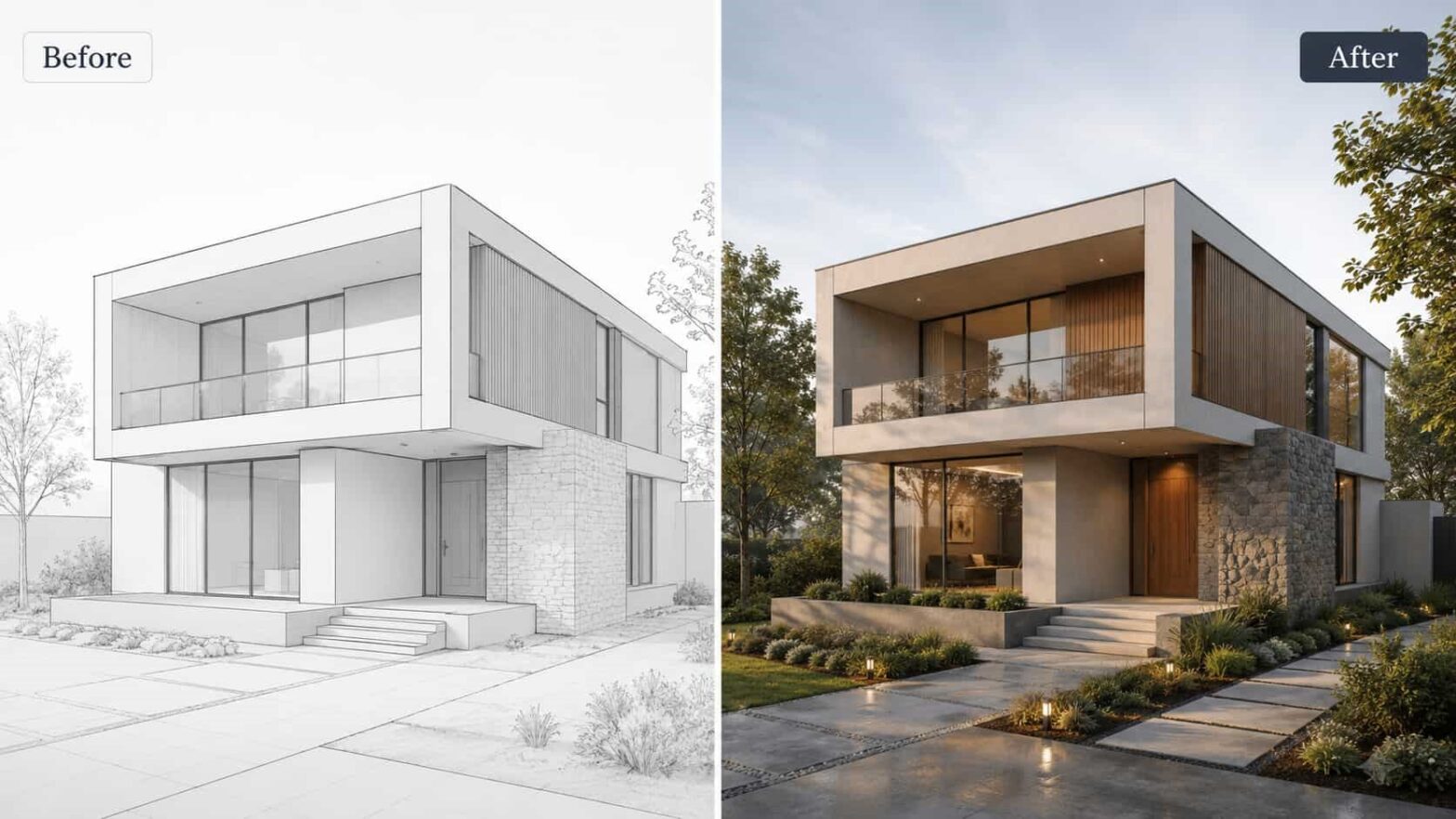
An architectural AI tool does not replace professional judgment. Instead, it helps design teams test ideas faster, turn rough inputs into visual concepts, and communicate design intent more clearly. From sketch-to-render workflows to AI-powered interior visualization, these platforms are becoming useful additions to modern design practice.
What Is an Architectural AI Tool?
An architectural AI tool is software that uses artificial intelligence to support design and visualization tasks. Depending on the platform, it can help generate concept images, improve renders, transform sketches into realistic visuals, stage empty rooms, visualize floor plans, or create presentation-ready images from basic project inputs.
Traditional CAD and BIM tools are still essential for precision, documentation, and construction workflows. AI tools serve a different purpose. They are most valuable during concept development, client presentations, mood exploration, and fast design iteration. Instead of spending hours preparing a test render, designers can quickly explore multiple directions and decide which one deserves further development.
How AI Rendering Helps Design Professionals?
One of the biggest benefits of AI in architecture is speed. Early visualization often takes a lot of time, especially when a team needs to test lighting, materials, furniture, landscaping, or facade ideas. AI rendering tools reduce that friction by creating realistic visuals from sketches, photos, 3D model screenshots, floor plans, or simple design prompts.
For architects, this means faster facade studies and concept presentations. For interior designers, it means quicker mood boards, furniture concepts, and material variations. For real estate agencies, it means empty rooms, renovation ideas, and property visuals can be presented more attractively. For students and small studios, it offers access to high-quality visualization without a complex rendering setup.
Key Features to Look For
The best architectural AI tool should match the way professionals already work. A strong platform should accept different input types, such as sketches, model screenshots, plans, sections, and photos. It should also give users enough control over style, materials, lighting, and composition so the final output feels connected to the original design.
Consistency is also important. A useful tool should preserve geometry, proportions, and design intent as much as possible. For professional workflows, attractive images are not enough. The output needs to support real design communication and help clients understand the project clearly.
Other useful features include interior and exterior rendering, virtual staging, inpainting, image enhancement, style transfer, masterplan visualization, and image-to-video tools for presentations.
Why ArchiVinci Is a Strong Option?
ArchiVinci is an AI rendering platform built specifically for architecture, interior design, real estate, landscape design, and visualization workflows. Instead of working only as a general image generator, it is structured around architectural inputs and design-focused modules.
Users can create visuals from sketches, photos, floor plans, site plans, model screenshots, and technical drawings. This makes it practical for professionals who already work with tools like SketchUp, Revit, AutoCAD, Rhino, or ArchiCAD and want to generate fast visuals from their existing design material.
ArchiVinci is especially useful for turning early ideas into client-ready images. Architects can test facade options, interior designers can explore styles and furniture layouts, and real estate teams can create more appealing visuals for listings or development proposals. The platform also includes workflows such as interior rendering, exterior rendering, masterplan visualization, virtual staging, AI image editing, render enhancement, and design videos.
Because it runs in the browser, users do not need a high-end local GPU or complicated rendering setup. This makes it accessible for small firms, freelancers, students, and teams that need fast visual output without slowing down their main design workflow.
How to Choose the Right AI Tool?
Before choosing an AI tool, design teams should define their main use case. Some tools are best for artistic concept images, while others focus on floor plans, urban analysis, or rendering. If the goal is professional architectural visualization across interiors, exteriors, plans, masterplans, and presentation assets, a specialized design platform is usually more useful than a general-purpose image generator.
It is also important to test the tool on a real project. Upload an actual sketch, model screenshot, plan, or room photo and compare the results with your current workflow. Look at the time saved, the quality of the output, and how much editing is needed before presenting it to a client.
Final Thoughts
Architectural AI tools are becoming practical assistants for design professionals. They help teams move faster, explore more options, and present ideas with greater clarity. The best results come when AI is used as part of a professional workflow, not as a replacement for design expertise.
For architects, interior designers, real estate teams, and visualization professionals who need fast and flexible rendering workflows, ArchiVinci is a strong option to consider. It helps transform early design inputs into polished visuals, making it easier to communicate ideas and move projects forward.